Showing posts with label Microsoft. Show all posts

Sunday, 12 April 2015

Microsoft Drops A New Windows 10 Build, Bringing The Love To Lots More Phones

Aspiration’s Growth Shows The Appetite For More Financial ServicesIt’s New Build Day for Microsoft kids, as the Redmond software shop dropped new code that will bring Windows 10 to a host of smartphones that were previously not able to handle to the beta operating system.
The build, number 10051, brings a host of new features to Windows 10 for phones, including refreshed core applications and the Project Spartan browser that has already cropped up for PCs running Windows 10.
Also in the mix is a new “universal” Maps application. Microsoft is working to bring all of computing under a single roof. That makes the Maps app important: Here is Microsoft showing off how apps will scale from small to large across various screen sizes.
According to the company, the new app “includes the best maps, aerial imagery, rich local search data, and voice-guided navigation experiences from both Bing Maps and HERE maps, integrated together for the first time into a single app for Windows.”
Below is a list of supported phones:
Lumia 1020
Lumia 1320
Lumia 1520
Lumia 520
Lumia 525
Lumia 526
Lumia 530
Lumia 530 Dual Sim
Lumia 535
Lumia 620
Lumia 625
Lumia 630
Lumia 630 Dual Sim
Lumia 635
Lumia 636
Lumia 638
Lumia 720
Lumia 730
Lumia 730 Dual SIM
Lumia 735
Lumia 810
Lumia 820
Lumia 822
Lumia 830
Lumia 920
Lumia 925
Lumia 928
Microsoft Lumia 430
Microsoft Lumia 435
Microsoft Lumia 435 Dual SIM
Microsoft Lumia 435 Dual SIM DTV
Microsoft Lumia 532
Microsoft Lumia 532 Dual SIM
Microsoft Lumia 640 Dual SIM
Microsoft Lumia 535 Dual SIM
If you want the new build, make sure that you are on the fast release ring. Otherwise, you will have to sit tight.
The development pace of Windows 10 remains rapid. It’s been notable to watch the enthusiasm gap between the current Windows 10 release cycle, and what took place with Windows 8. That’s to say that people seem to care more this time around.
An example of this is my new Twitter nemesis, Gabe Aul from the Windows 10 team, who regularly racks up oodles of favorites for his oracular drippings concerning when new code might, or might not, land:

Riveting. You can check shots of the new build here.

Saturday, 4 April 2015

Microsoft Will Remove “Do Not Track” As The Default Setting In Its New Browsers

Weekends Are The Best Time To Promote Most Apps, Study FindsMicrosoft today announced that going forward, it will not turn on the “Do Not Track” feature in the upcoming versions of Internet Explorer and Spartan by default.
The “Do Not Track” setting in many popular browsers tells websites and their advertisers that you want to opt out of third-party tracking for advertising purposes. All of the major browser vendors, including Google, Mozilla, Opera, Apple and Microsoft, support this feature, but whether advertisers honor the user’s request — and it’s no more than a request sent by the browser — is up to them. And most probably don’t.
Microsoft started enabling “Do Not Track” as the default setting with the launch of Internet Explorer 10. Unsurprisingly, this created a bit of a controversy. Previous to Microsoft’s decision, advertisers had agreed to honor Do Not Track, as long as it wasn’t the default setting. They argued that the decision not to be tracked should be made by the user and not the browser vendor. Microsoft stuck to its guns saying users could always opt out during the setup process, and “Do Not Track” remained the default — until now (and the number of advertisers that honored it remained low).
Chrome and Firefox leave “Do Not Track” off by default.
Today, the company is reversing its stand. Microsoft Chief Privacy Officer Brendon Lynch argues that it’s doing so in order to comply with the latest draft of the official W3C standard for “Do Not Track.” This new draft explicitly notes that “the signal sent MUST reflect the user’s preference, not the choice of some vendor, institution, site or network-imposed mechanism outside the user’s control; this applies equally to both the general preference and exceptions.”
“Put simply, we are updating our approach to DNT to eliminate any misunderstanding about whether our chosen implementation will comply with the W3C standard,” Lynch writes today. “Without this change, websites that receive a DNT signal from the new browsers could argue that it doesn’t reflect the users’ preference, and therefore, choose not to honor it.”
Given the voluntary nature of “Do Not Track,” it probably doesn’t matter all that much whether you turn it on or off anyway. If you want to make sure you aren’t tracked, using tools like Disconnect  and add-ons like Ghostery, uBlock and the EFF’s Privacy Badger is more effective anyway — at least on the desktop

Microsoft Is Saying Exactly “Nothing” About The Surface Pro 4

Apple Watch Pre-Orders Will Start Just After Midnight Pacific On April 10thOn the heels of announcing the Surface 3, Microsoft trotted over to Reddit for its now-traditional AMA dance with the folks. The Surface 3 is a smaller, less expensive iteration of the Surface Pro 3, which was released last year.
The Pro 3’s commercial performance has been superior to its predecessors, making its successor all the more interesting as a potential. In the AMA, Microsoft was pitched a question that was a jokish attempt at getting them to confirm the existence of the Surface Pro 4, and perhaps even provide guidance on when it will be released.
You won’t believe what happened next!

So, not much there. I confirmed with Microsoft that Surface’s Panos Panay answered that particular question.
The AMA contained familiar questions including why Microsoft charges separately for Surface machines and its keyboard attachments, but also some that went unanswered that were worth considering. The second most upvoted question at the time of writing is simple: “Any Chance we will see an external GPU for the Surface Pro line anytime soon?” Microsoft didn’t respond.
Microsoft is in a slightly uncomfortable position, building and releasing hardware that is designed for a new operating system that isn’t quite done yet. Windows 10 will be out later this year, meaning that only the first few traunches of Surface 3 buyers will have to spend much time on Windows 8.1. Once Windows 10 makes it out the door, the new Surface devices will make a bit more sense.

Friday, 3 April 2015

Microsoft Debuts Office Lens, A Document-Scanning App For iOS And Android

UK’s myDogBuddy Merges With Spain’s Bibulu To Become Europe’s Largest Dog Sitting MarketplaceMicrosoft today launched Office Lens, a mobile document scanner app that works with OneNote, for iOS and Android smartphones. The app, which allows users to snap photos of paper documents, receipts, business cards, menus, whiteboards, sticky notes and more, was first launched a year ago as an application designed only for Windows Phone devices.
But in conjunction with the company’s newer strategy to embrace other platforms outside its own, the app has now arrived on Apple’s App Store and on Android phones, where it will sit alongside dozens of other Microsoft applications, including Office and Outlook.
Office Lens’ core functionality itself is not all that different from a number of document-scanning applications on the mobile app stores today, like Scanner Pro, TinyScan Pro, Scanbot and more. And much like Evernote’s Scannable app, for example, it exists more as an add-on or complement to a larger, more prominent product – in Microsoft’s case, OneNote.
Like most scanner apps, Office Lens identifies the text on the images it captures using optical character recognition (OCR), which allows you to later locate the file in question using keyword search in OneNote or in Microsoft’s cloud storage site, OneDrive. You can also convert the images you scan of paper files and whiteboards into Microsoft Office formats and more, including Word documents, PowerPoint presentations and even PDFs and JPGs. These can be inserted into OneNote as images, the company says.

In addition, Microsoft says that Office Lens offers a business-card scanning function that lets you turn cards into contacts you can add to your smartphone’s address book. That initially sounds similar to the functionality that Evernote Scannable offers, you’ll think. However Evernote also pulls in LinkedIn details, which is handy as it allows you to grow your network. (LinkedIn used to offer its own card-scanning app, but later shut it down and pointed people to Evernote instead.)
But with Office Lens, the process of turning cards into contacts is more involved than with Scannable. As a previous Microsoft blog post explained, it still involves the use of OneNote. That is, OneNote is able to recognize the contact information on the card, then you can open the attached VCF file from the OneNote app to save the contact details to Outlook or your phone’s contact list.
In Scannable, by way of comparison, you simply tap one button to save the scanned card to your phone’s contacts. That makes Scannable the better option for those looking mainly for a business card scanner, while Office Lens is really about catering to the heavy OneNote-using crowd instead.
Also like Evernote Scannable, Microsoft’s app also offers the ability to create an online archive of your scans in its own OneDrive service.
The new Office Lens app is available on the iTunes App Store for iOS users, while Android users are being asked to join the “preview” for the product via Google+. From here, they’ll be able to test the version ahead of its public debut.
The release comes at a time when Microsoft, a historically more closed company that tried to keep customers in its own ecosystem, has been expanding to other platforms besides its own.
Today, the company has extended some of its most popular products and services to competing mobile platforms like iOS and Android, including by launching Office for iOS late last year, as well as Outlook for iOS and Android, various MSN properties, OneDrive and more. In fact, the company now has over 100 iOS and Android applications in total.

Thursday, 2 April 2015

Microsoft Brings Collaboration To New Office Tool Sway

What The Kapors Have Learned From Years Of Working On Diversity in TechRemember Sway? It’s a recent addition to Microsoft’s Office suite, blending together note taking, presenting, and now, collaboration. The software is notable in that it was launched first in-browser, a step away from the traditional, desktop-focused Office apps like Word and Excel.
Sway was opened to the general public in December of 2014. At the time, Microsoft noted that it had picked up a million unique visitors to Sway’s website, and 175,000 “requests to join.” Presumably those figures are now far surpassed. I’ve asked Microsoft for refreshed numbers, and will update this post when I hear back from the firm.
TechSupport has kept an eye on Sway since its introduction because it’s a new page of sorts for the Office crew — if you were going to build a new Office product, what would it be? Microsoft seems comfortable with Sway sitting somewhere on a cloud, in between the use-cases of Word, and Power Point.
Also out today is the ability to copy Sways, so that you can have a version of your own. That will be useful among groups, when people might want to preserve a specific version or the like for later use.
Microsoft lagged behind Google in bringing real-time collaboration to its productivity tools, and has yet to finish the project. It’s good, therefore, to see the company keep the work moving forward.

Tuesday, 31 March 2015

Microsoft Simplifies Visual Studio Lineup And Pricing For Enterprise Users

Postmates Will Deliver Bastian Lehmann Via Bike To The Disrupt New York StageMicrosoft today announced that it will consolidate its Visual Studio Premium and Ultimate offerings for enterprises into a single product once it launches Visual Studio 2015 later this year. Now called Visual Studio Enterprise With MSDN, this new version will include all of the features developers were getting with Visual Studio Ultimate (IntelliTrace in production, CodeLense support, etc.).
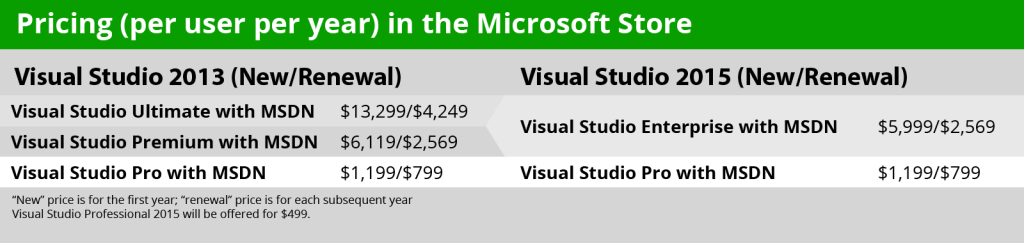
It’s also dropping the price of this new Enterprise version to slightly below the old price of the Premium edition. Enterprise with MSDN will now cost $5,999 for the first year and $2,569 for subsequent years (the old price for Premium was $6,119 for the first year and $2,569 from then on). That’s a 55 percent price drop for current Ultimate subscribers.
The price of Visual Studio Pro, the company’s offering for individuals and smaller teams, will remain at $1,199 for the first year and $799 for renewals.
It’s worth noting that Microsoft will continue to offer a standalone, non-subscription version of Visual Studio Professional, too, for $499.
visual-studio-table
Now there’s one wrinkle to this story. Enterprises that currently have volume licensing deals are probably getting a better price for Premium right now than for the new Visual Studio Enterprise edition. Microsoft tells me that the typical user there pays $3,573 for the first year and $1,312 for the renewal and that it expects the volume price for Enterprise to be $4,466 (and $1,640 for renewals).
As Microsoft’s general manager for Cloud and Enterprise Developer Platform Marketing and Worldwide Sales Mitra Azizirad told me earlier this month, the company will offer these Premium users the ability to renew their subscription at the old price for the calendar year after the launch of Visual Studio 2015. After this renewal, they will be paying roughly 25 percent more than they are now for the Enterprise version, but the company argues that they are also getting far more features than before.
Azizirad noted that Microsoft’s enterprise customers had been asking for a better way to standardize their Visual Studio deployments across the company, and today’s announcement reflects its attempt to address this.
Last year, Microsoft probably made its boldest Visual Studio move yet when it launched an (almost) fully-featured free Community edition of the application that included support for extensions — something the previous (and very limited) free versions never offered. Microsoft tells me that it has seen over 2 million downloads of the Community edition since it launched.
Related ArticlesMicrosoft's Visual Studio Online Now Lets Developers Add Unlimited Stakeholders For FreeMicrosoft Previews New Azure Portal, Integrates Visual Studio Online And Basic Code EditorMicrosoft Updates Azure With Deeper Visual Studio Integration, Puppet And Chef Support
As part of the Visual Studio 2015 updates, some of the features that were previously only available in high-priced versions will also move down the ladder. CodeLense, for example, is now available in Visual Studio Professional and the free Community edition is getting support for PowerPoint storyboarding.
“We want to make the right moves to bring the most popular features to the most developers as possible,” Azizirad told me. “This is really a move in terms of accessibility.” She also noted that Microsoft wants to show developers that it is listening and responding to their needs.
So how does all of this work out for existing Visual Studio subscribers? Mitra tells me that all active premium customers will get a free upgrade to the enterprise version, whether they bought Premium or received it through programs like BizSpark or the Microsoft Partner Network.

Microsoft Jumps Into The Mobile Device Management Fray

Testlio Raises $1M To Provide On-Demand QA TestersMicrosoft made good on its promise to add mobile device management (MDM) to its Office 365 productivity service, making the feature generally available today to commercial customers. Microsoft has added, in English, the ability for large companies to manage Office on the phones of their employees, regardless of whether the handset in use is a personal or corporate device.Mobile device management is a heated space inside the enterprise market. MobileIron, a company that offers MDM along with other related services, recently went public. Another market participant, Good Technology, filed to go public, shelved its offering, and now appears ready to take another crack at flotation.
Microsoft’s MDM product will be free to commercial Office 365 customers. That is sensible, as the software company is, I presume, more focused at the moment on growing its seat-base rather than wringing positive dollar churn from fresh accounts.
As you would expect, Office 365’s MDM tooling includes the ability to wipe information from employee handsets, implement security requirements and restrict access to data.
Office 365 is a key product for Microsoft, which is working to convert its single-sale software model into a recurring stream of subscription revenue. The company breaks out its consumer Office 365 subscriber base on a per-quarter basis, but not its commercial seat count for the product. If MDM can help Microsoft sell more quickly into the enterprise market, the company could make progress toward beating its currently tepid, expected growth tally for its current fiscal year.
Update: I wasn’t masterfully precise in the above. Microsoft offered MDM through its Intune service previously, but is now rolling it out to the Office 365 product. If I managed to obfuscate, I apologize for the confusion.

Microsoft Releases Preview Of Its New Browser ‘Project Spartan’ In Fresh Windows 10 Build

The Next Billion-Dollar Market Opportunity Is Mobile EnterpriseMicrosoft wasn’t kidding when it promised to ship Windows 10 builds more quickly. Today, less than two weeks after its last iteration, the company has kicked out a new build that contains an important new feature: Project Spartan.
The new build’s number is 10047 10049, up a total of 68 from the preceding release.
If you are currently on the “fast ring” of the Windows Insider program, say hello to the new code. For the rest of you on the more conservative build cycles, wait for the dust to settle. You can, of course, change your ring setting and get the new tools more quickly. (Note: This is not the upcoming build that will support a host more Windows Phone handsets. This build is nearly all about Project Spartan.)
Project Spartan, the current, public codename of Microsoft’s new browser, will replace its venerable predecessor not all at once, but in steps. This fact has caused some confusion.
What can Project Spartan do? It comes with Cortana, the company’s digital assistant that lives in both current builds of Windows Phone and Windows 10. By bringing it to the browser, Microsoft makes progress on what appears to be an implicit goal to ensure that Cortana lands on every screen where the company vends a platform. (Xbox, gear up.)
Microsoft highlighted pen capabilities, simple reading views, and a rendering engine built for the modern Web as points in the browser’s favor during a call.
This is the first public release of Project Spartan. So what we will see is a preview of Microsoft’s browser vision. Project Spartan remains an incomplete product, the company said in a call. That’s hardly a sin for beta software, of course, but it will be a decent data point to stress-test Project Spartan regardless — how far along and stable is this new vision?
According to a separate blog post from the company, 10047 10049 contains a number of bug fixes, and known issues. That’s par for Windows 10 course.
Build, Microsoft’s developer conference, is next month, meaning that Microsoft might eventually hit pause on new builds to store up new bits and tiddles to show off at the event. Today, however, was not such a case.
Update: Microsoft switched to a newer, shinier build — 10049 — after it had provided TechCrunch with pre-release reference materials that noted the release as build 10047. Post has been amended with correct numbers, and passive-aggressive strikethrough text.

Tuesday, 10 March 2015

Microsoft Hints At Faster Windows 10 Build Releases

Apple Shares Shift In Wake Of New Product AnnouncementsMicrosoft’s Gabe Aul hinted today at faster releases of new builds of the company’s Windows 10 operating system.
The company’s public testing program has attracted more than 2 million users to date. However, according to Aul, there are “lots of questions” regarding when a new build will be released. Given that Microsoft is more than willing to drop new code in between keynote releases, like its original enterprise preview, and its coming developer preview, the question matters.
According to Aul, there are several internal rings that employ even less-baked software than is released to Microsoft’s self-selected testing community. Here’s his diagram:
Screen Shot 2015-03-09 at 3.24.23 PM
There are more internal tiers than external, unsurprisingly.
According to Aul, Microsoft may have been “too conservative about pushing builds to the Fast ring for Windows Insiders.” Perhaps. Aul’s group, according to the executive, has had “serious conversations last week […] about a ‘Ludicrous Speed’ ring,” which he then asserts is “no joke.”
I highlight the above not strictly for its Windows 10 impact, but also to underline how Windows might be constructed in the future. If Microsoft wants to move faster with builds now, it might move faster in the future. That makes the current Windows 10 pace perhaps slower than what we will see next.
Anyhoo, summing the above, Microsoft is doubling down on its plan to get new operating system code into the market more quickly than before.

Sunday, 1 March 2015

Two New Lumia 640 Models Discovered After Microsoft Leak

Toward Our 3D FutureA few pieces of data point to two new Lumia models, the 640 and 640 XL, a pair of low-end phones that should be announced tomorrow morning. The device specs were posted on NokiaPowerUser and point to a 5-inch 640 device, as well something called the 640 XL, which should be slightly bigger and follow the Lumia 1320.
Both will have front and rear-facing cameras and the usual candy-colored replaceable cases. The devices will run a Snapdragon 400 processor and include 8GB of storage. These low-end devices should ship for $275 in the U.S., and a dual-SIM option could launch in India and Asia.
Microsoft will make its official announcements tomorrow morning in Barcelona at 2:30 a.m. Eastern.
Look for more coverage from MWC 2015 here.
0
SHARES0Share0Tweet0Share0000AdvertisementAdvertisementCrunchBaseMicrosoftFounded1974  OverviewMicrosoft is an American multinational corporation that develops, manufactures, licenses, supports and sells computer software, consumer electronics and personal computers and services. Its best known software products are the Microsoft Windows line of operating systems, Microsoft Office office suite, and Internet Explorer web browser. Its flagship hardware products are Xbox game console and the Microsoft …LocationRedmond, WashingtonCategoriesVideo Games, SoftwareFoundersBill GatesWebsitehttp://www.microsoft.comFull profile for MicrosoftLumia CapitalFounded2011  OverviewLumia is an expansion-stage VC partnering with leading tech companies in under-invested emerging markets and forward-thinking US companies targeting these markets to accelerate growth. We employ a hands-on strategy, working closely with management teams by pairing Silicon valley insights and contacts with global knowledge sharing and relationships to propel companies through expansion-stage challenges …\

Wednesday, 11 February 2015

Microsoft Confirms Sunrise Acquisition, Adds Depth To Its Mobile Productivity Offerings

Microsoft is buying the mobile productivity reputation it seemed disinclined to build for itself for so many years, and the latest addition to the roster is Sunrise, the calendar app that managed to raise $8.2 million in venture funding and achieved rave reviews on the many platforms where it appeared, including the iPhone, iPad, Android hardware, the Mac and the web. TechCrunch first reported that Sunrise was being acquired for $100 million or more last week, and now Microsoft has confirmed that the deal went down in a video posted to YouTube (now made private).
Sunrise began as a newsletter that provided calendar info via email, but then quickly switched gears as a mobile-first alternative to the built-in calendar apps offered by Apple, with a focus on optimizing the experience for small-screened devices. It incorporated weather and offered RSVPs without leaving the app, along with clever UX tweaks like a two-week synopsis that expands when touched to reveal the whole month, making the most of the available real estate depending on how a user’s interaction is signalling their particular needs at any given moment.
Microsoft appears to recognize the value in trusting mobile companies to provide the best mobile experiences in areas where they once led: Redmond acquired Accompli late last year, a celebrated mobile email client, and quickly turned it into Outlook for iOS and Android, a version of its mail client that is mobile-first, taking the name of the desktop dinosaur that made Microsoft a household standard in productivity apps but discarding pretty much everything else from that legacy software in favor of a streamlined, smartphone-optimized experience.
Based on Outlook’s example, it’s exciting to think of what Microsoft might do in terms of taking the strong foundation of Sunrise and turning it quickly into one of the new core components of Microsoft’s growing mobile productivity empire. For a company that has traditionally been criticized for being slow-moving, Accompli and now Sunrise offer a vision of the future that suggests true vitality, if not outright innovation.
0
SHARES0Share0Tweet0Share0000AdvertisementAdvertisement

Microsoft Wants To Buy Love In Silicon Valley

Y Combinator and Microsoft announced a program this week that will pour free access to the Azure cloud computing platform onto the incubator’s current class of startups.
The deal includes $500,000 in credits to Microsoft’s cloud computing service Azure, and three years of access to its Office 365 suite of productivity tools. Half a million worth of Azure usage is nothing to Microsoft, but for young companies that are part of Y Combinator, the sum is a multiple of the cash that they receive to help build their firms as part of the program. That makes it a materially interesting offer.
Microsoft also runs a number of accelerators of its own around the world in places like Israel under its Microsoft Ventures team. That group was formed when disparate accelerator work was unified with what was formerly the Bing Fund. The latter effort appears to be either on the wane, or over. Former Microsoft Ventures don Rahul Sood told me on Twitter that Microsoft had indeed


© 2013 Tech Support. All rights resevered. Designed by Templateism

Back To Top